1x by Yuri Shevchenko
yandex 01
yandex 02 - heat
yandex 03
yandex 04
yandex 05
yandex 06
yandex 07 - tln
yandex 08 - tln
yandex 09
yandex 10 - tl
yandex 11
yandex 12
yandex 13
Валерия Колчанова bw portrait
Saju
ArtOfDan
bw contrast photo portrait people
Showing posts sorted by date for query people. Sort by relevance Show all posts
Showing posts sorted by date for query people. Sort by relevance Show all posts
Friday, October 29, 2021
Inspiration BW photography

Thursday, January 31, 2019
automating your work at pc
automating maybe 50%? your work at pc
automating maybe 80%? our RAW editing files
Discover IFTTT and Applets - IFTTT
Applets scripts automation pc
automating mobile ifttt
My Capture One 13 Commitment - with AppleScript
10 aplikací pro Mac a PC, které vám pomohou s produktivitou
JotForm
JotForm's software creates forms with a drag and drop creation tool and an option to encrypt user data
This photography session booking form template can be used for booking
www.jotform.com/form-templates/?cards
www.jotform.com/form-templates/photo-session-deposit
JotForm Mobile Forms

Theme Cake Order Form
www.jotform.com/form-templates/theme-cake-order-form

www.jotform.com/form-templates/category/education
Wedding Cake Order Form
www.jotform.com/form-templates/wedding-cake-order-form-ss
JotForm and IFTTT's New Integration Connects Form Responses to Hundreds of New Apps
www.prnewswire.com/news-releases/jotform-and-ifttts-new-integration-connects-form-responses-to-hundreds-of-new-apps-300373092.html
Forms
Build and share online forms Create forms, collect data and payments, and automate your workflows
Wufoo
www.wufoo.com
www.capterra.com/p/173233/Wufoo
Forms & surveys for the people
www.typeform.com
Formstack: Online Form Builder | Form Creator for Online Forms
Bits Bits Business, Innovation, Technology, Society A Web Tool That Lets You Automate the Internet
The Productivity Apps You Need In 2019
Trello makes project management quick and easy
30 Day Photo Challenge
30 Day Photo Challenge PicsArt


ifttt
auto
script
action
automat
Sunday, December 30, 2018
How to Speed Up slow Lightroom?
How to Speed Up slow Lightroom?
Adobe about LR:
"The Spot Removal Tool and Local Corrections Brush are not designed for hundreds to thousands of corrections.
If your image contains many (hundreds) of localized adjustments, consider using a pixel-based editing application such as Affinity Photo or Photoshop for that level of correction..."
Top 10 Ways To Automate Lightroom!
Ultimate Guide To Speed Up Your Lightroom Workflow!
Learn to use keyboard shortcuts as much as possible:

How to Significantly Speed Up Lightroom
Stop Working Off of an External Hard Drive
Stop Culling in Lightroom
Adjust Import Settings
10 Tips to Improve Lightroom Speed and Performance Without Additional Hardware
How to Use Lightroom CC Faster
Adobe updates Lightroom Classic and finally makes it faster
Lightroom Performance Tips
7 Tips for Making Lightroom Run Faster
30+ Outstanding Adobe Lightroom Tutorials & Tips
Optimize performance adobe lightroom
https://helpx.adobe.com/lightroom/kb/optimize-performance-lightroom.html
Use optimal settings in Lightroom
Pause ‘Sync With Lightroom CC’ while making edits in Lightroom Classic
Keep standard-size previews as small as possible
Keep the catalog and preview cache in the same folder
Leave autowrite XMP turned off
Optimize the catalog
Increase the Camera Raw cache size
Spot Removal tool, local corrections, and History panel - don't use too much :o
Order of Develop operations
Avoid corrections that you don't need
Zoom options
Delete the Lightroom previews cache
Reduce the number of presets
How to Backup Your Lightroom Catalog
How to Use Lightroom Rename Catalog
How to Merge Lightroom Catalogs
Where Does Lightroom Store Photos?
6 Ways to Organize Your Lightroom Folder Structure
Order of Develop operations
The best order of Develop operations to increase performance is as follows:
Spot healing. Geometry corrections, such as Lens Correction profiles and Manual corrections, including keystone corrections using the Vertical slider. Global non-detail corrections, such as Exposure and White Balance. These corrections can also be done first if desired. Local corrections, such as Gradient Filter and Adjustment Brush strokes. Detail corrections, such as Noise Reduction and Sharpening.
Note: Performing spot healing first improves the accuracy of the spot healing, and ensures the boundaries of the healed areas match the spot location.
source adobe:
https://helpx.adobe.com/lightroom/kb/optimize-performance-lightroom.html
Mateusz Antonowicz - September 9, 2017 [Edited]
source:
https://fstoppers.com/originals/how-significantly-speed-lightroom-195082
Lightroom Exporting - Any ways to speed it up or try demo and Switch to Capture One.
Much faster to export files

www.lightroompresetshoppe.com/speed-up-your-lightroom-workflow-ultimate-guide/
Fastest Lightroom? uninstall Lightroom forewer
Critical Workflow Upgrades I Should Have Made Sooner
Faster with lightroom?
impossible
edit
editor
Adobe about LR:
"The Spot Removal Tool and Local Corrections Brush are not designed for hundreds to thousands of corrections.
If your image contains many (hundreds) of localized adjustments, consider using a pixel-based editing application such as Affinity Photo or Photoshop for that level of correction..."
Top 10 Ways To Automate Lightroom!
Ultimate Guide To Speed Up Your Lightroom Workflow!
Learn to use keyboard shortcuts as much as possible:

How to Significantly Speed Up Lightroom
Stop Working Off of an External Hard Drive
Stop Culling in Lightroom
Adjust Import Settings
10 Tips to Improve Lightroom Speed and Performance Without Additional Hardware
How to Use Lightroom CC Faster
Adobe updates Lightroom Classic and finally makes it faster
Lightroom Performance Tips
- SSDs
- Switching off Services
- Graphics Processing
- Camera Raw Cache
- XMP Changes
- Setting Preview Sizes
- Keeping 1:1 Previews
- Optimising Catalog
- Clearing History
- Preset Housekeeping
- Apply Bulk Presets quicker
- Histogram and Solo Mode
- Hiding Modules
- Culling outside of Lightroom
- 1:1 Previews
- Using Import Presets
- Apply Sharpening and Noise Reduction last
7 Tips for Making Lightroom Run Faster
30+ Outstanding Adobe Lightroom Tutorials & Tips
Optimize performance adobe lightroom
https://helpx.adobe.com/lightroom/kb/optimize-performance-lightroom.html
Use optimal settings in Lightroom
Pause ‘Sync With Lightroom CC’ while making edits in Lightroom Classic
Keep standard-size previews as small as possible
Keep the catalog and preview cache in the same folder
Leave autowrite XMP turned off
Optimize the catalog
Increase the Camera Raw cache size
Spot Removal tool, local corrections, and History panel - don't use too much :o
Order of Develop operations
Avoid corrections that you don't need
Zoom options
Delete the Lightroom previews cache
Reduce the number of presets
How to Backup Your Lightroom Catalog
How to Use Lightroom Rename Catalog
How to Merge Lightroom Catalogs
Where Does Lightroom Store Photos?
6 Ways to Organize Your Lightroom Folder Structure
Order of Develop operations
The best order of Develop operations to increase performance is as follows:
Spot healing. Geometry corrections, such as Lens Correction profiles and Manual corrections, including keystone corrections using the Vertical slider. Global non-detail corrections, such as Exposure and White Balance. These corrections can also be done first if desired. Local corrections, such as Gradient Filter and Adjustment Brush strokes. Detail corrections, such as Noise Reduction and Sharpening.
Note: Performing spot healing first improves the accuracy of the spot healing, and ensures the boundaries of the healed areas match the spot location.
source adobe:
https://helpx.adobe.com/lightroom/kb/optimize-performance-lightroom.html
Mateusz Antonowicz - September 9, 2017 [Edited]
source:
https://fstoppers.com/originals/how-significantly-speed-lightroom-195082
Lightroom Exporting - Any ways to speed it up or try demo and Switch to Capture One.
Much faster to export files
Hello, Lr Classic
I know from my experience on the KelbyOne Help Desk, as well as from various forums and conversations with other Lightroom users, that improving performance has been high on everyone’s wish list. Adobe has apparently taken this issue seriously and devoted most of its resources for this version to identifying various points in the workflow where speed can be improved. One of the first places you may notice an improvement is in launching the program, which should be more noticeable with larger catalogs. I’ve definitely noticed an improvement here.
www.lightroompresetshoppe.com/speed-up-your-lightroom-workflow-ultimate-guide/
Fastest Lightroom? uninstall Lightroom forewer
Critical Workflow Upgrades I Should Have Made Sooner
Faster with lightroom?
impossible
edit
editor
Thursday, February 1, 2018
Silver - Shadows BW
Silver - Shadows BW

Perfectly Silver
A great image starts with what we see before we press the shutter. A
great black and white finishes with Silver 3, a collection of LR tools
dedicated to perfect black & white.
- Silver 3: Completely rebuilt for epic black and white.
- One Clicks: Bring your image alive with a click.
- Zonals: Dynamic tools for game changing light.
- 3D tints: Just the right hint of hue every time.
- Master Mixes: Easy mod presets, total control.
- Works in LR4—LR Classic CC and in LR CC
- Backed by our Iron Guarantee.
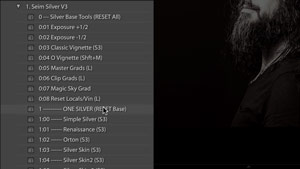
Instant Conversions: One clicks make the perfect Black and White without leaving Lightroom! You are going to love Silver’s fast conversions that get you where you need to go. But you can also customize to your hearts content.
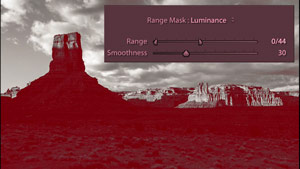
Zonals: It’s all about tone. Zonals use the latest mask features in LR to give you dynamic tone balance that maintains highlight and shadows while giving you deep darks and crisp balanced whites that award winning black and white demands.

Master Mixes: Those last few adjustments can really make your image sing. Add Zonal mods, new classic and 3 dimensional tints, or mix the light with channel mods that can attach onto any conversion for infinite possibilities.
Silver 3 Black & White Workshop
What’s New in V3:
— Completely rebuilt presets for richer deeper black and white
— Zonals: Dynamic tools that use the latest masking tools ion LR for game changing tone.
— 3D tints: Just the right hint of hue every time. Now with dimensional tinting using Lightroom latest features.
— Built for workflow. A decade of creating tools for efficiency make made Silver 3 the best yet. Take your days back.
— UPGRADE: Own Silver Shadows 1 or 2? We emailed you an upgrade coupon to SAVE 50% Get in touch if you missed it.
Silver
3 was decade in the making. At version 1 Silver Shadows started as a
project to help us get darkroom-inspired black and white without leaving
Lightroom. Silver 2 took that further and for years has been an
essential tool for photographers around the globe. But as other black
and white software started to fade away or get abandoned. Silver
3 is a new generation of black and white. It’s a system driven by the
simplicity and quality of a Lightroom workflow but inspired by the the
nuances and rich tones of film and the masters.
We
made Silver 3 more, we created a system to help us fulfill
visualizations and us use the entire tonal range like never before. We
designed it to help us get back to basics and become more intimate with
light than ever before. Silver 3 puts incredible black and white at your
fingertips. For batches, for fine art, for images that are perfect in
camera and for those that need a bit of help. Here’s what people have to say.
Wednesday, May 31, 2017
Why People Switch from Canon or Nikon to Mirrorless?
Why People Switch from Canon or Nikon to Mirrorless?
Full-Frame Interchangeable Lens Cameras

What is the lightest and cheapest full frame camera/lens set?

A Canon Shooter’s Review of Nikon Lenses & A Sony Body | In The Enemy’s Camp
Why People Switch from Canon to Fujifilm :: Fujifilm Vs. Canon, Nikon and Sony ::
6 Points to Consider When Switching to Mirrorless

FUJI X-T2 REVIEW & Why I switched from Sony


Top 5 reasons to switch from Canon to Fuji

Mirrorless Telephoto Comparison Leica, Fuji, Nikon, Olympus
Nikon To Introduce Full-Frame Mirrorless Camera R&D Lab Director Interview Discussion

The Earth-Moving Feeling You'll Get After Switching to Nikon: Meh

Why I Switched from Nikon to Canon: Scott Kelby

7 Things I Learned Switching From Canon to Nikon

My Camera Switch from Canon to Nikon, and Then Back Again
marketing vs data
Monday, May 1, 2017
How To Shoot Dreamy Backlit Portraits
How To Shoot Dreamy Backlit Portraits
With Natural LightLisa Holloway - How To Shoot Dreamy Backlit Portraits With Natural Light - tutorial
My favorite subjects to shoot are often the people closest to me—my own 10 children. My two-year-old son, Elliott, has slowly been working his way out of the “run-away-from-the-camera-as-fast-as-my-little-feet-can-take-me’ phase and progressing into the ‘oh-I-might-sit-here-for-a-few-pictures-if-you-let-me-have-ice-cream’ phase. I had been wanting to take some updated photos of him and settled on a country boy theme. I was going for something simple that would draw attention directly to him and allow your eyes to settle on his face...
Arizona Mother Of 10 Takes Magical Portraits Of Kids Outdoors
Say Hello To 500px ISO With Elena Shumilova
These 25 Photos Of Bunny Friendships Will Make You Feel Young Again





https://500px.com/lisaholloway
http://ljhollowayphotography.com/investment/
5 secrets to amazing fall photos
Gallery - love stories
http://myfourhensphotography.com/feel-the-moments


20 Photographers Growth in Post-Processing


Lisa-Holloway5--Children Portraits by Lisa Holloway


Children Portraits by Lisa Holloway
Fall/Automn Warm Edit Autumn | Photoshop Tutorial
Top 10 kids photographer (2016)
Fall edit
https://www.youtube.com/watch?v=0oMmHpHTCzU
canon
200mm f 2.0 L lens
My camera settings were ISO 400, an aperture of F-2.0, and a shutter speed of 1/640
The scoop on lifestyle photography Annie Tao
Defining Lifestyle Photography
master
edit
Child
Children
Subscribe to:
Posts (Atom)
2. Render smart previews then CHANGE the name of photos folder [this is different from just checking that box mentioned in article], LR will render smaller files [from 24MPX, it makes about 2600x1700 px files, which are large enough for checking focus and noise etc].
3. Use import preset with camera specific ISO etc, your choice.
4. Import ONLY presets you will use, making LR caching 10000 or so presets is not good. [some people are preset hoarders], This speeds up LR a lot.
5. Make 1:1 previews of SMART previews [when they are detached from the folder], to have import preset, smart preview and 1:1 on start.
6. Flag pics that you will edit [cull], rather than doing black flag on non-chosen pics [morale thing, you reward yourself, you are more likely to edit with more 'oomph' //optional
7. After whole cull and edit, change the name back to have original files in LR, check sharpening and noise reduction, and export.
8. After job is exported to JPGs, export whole catalog with files onto a slower archive folder. Name it, so that you know which job was that.
9. New pictures? New catalog, and from 1 to 9 again, Starting on fastest drive with clean new empty catalog, import photos as instructed.
__________
That's my workflow, and I don't see how it could be any faster [culling maybe, but with smart previews it's ultra fast]. Hope this helps anyone, I can go into details if someone wants to learn more about my workflow. It works for superfast PCs and slow laptops, so far haven't seen it go any faster.